
Can AI make a workout plan? Yes, with three checks.
By Complete OS · Published November 6, 2026
Yes. AI is good at the planning part of training: turning "three days a week, dumbbells only, 45 minutes" into a structured split with exercises, sets and reps. It is not reliable on how fast to add weight, it doesn’t know your injury history unless you tell it every time, and it can suggest a jump in volume or intensity that’s too much too soon. Use it to draft the plan, check the progression against how you actually feel and perform, and get form or injury guidance from a trainer or physical therapist, not a chatbot.
What AI is genuinely good at
Writing a workout split is mostly structure: picking exercises that fit your equipment and time, balancing muscle groups across the week, and giving you something to start with instead of a blank page. A chatbot does that well, because it’s organizing known exercises, not inventing training science.
- Turning your equipment and schedule into a weekly split (push/pull/legs, upper/lower, full body).
- Suggesting exercise substitutions for an injury, a crowded gym, or equipment you don’t have.
- Explaining an exercise or a term you don’t recognize.
- Giving you a first draft to react to and adjust, instead of staring at a blank program.
Where it goes wrong
Progression. How much weight to add, and how fast, depends on how your last session actually went — a general chatbot has no idea what you lifted last week unless you paste it in every time, and even then it’s guessing at a safe rate of increase.
Injury and form. AI can’t watch you lift. It can describe a cue, but it can’t tell you your form broke down on rep 8, and it can suggest a plan that’s too aggressive for a bad shoulder or a recent injury if you don’t say so clearly — and it won’t always ask.
Overtraining. A chatbot asked for "an intense plan" will often give you one, with no sense of whether you’re already fatigued, sick, or under-recovered. It plans the week it’s told about, not the body that has to do it.
What to tell an AI so the plan is useful
A workout plan is only as good as what you put in. Give it the same things you’d tell a trainer on day one.
- Your goal: strength, muscle, general fitness, or training for something specific.
- Days per week and time per session, honestly — not the number you wish were true.
- Equipment: home dumbbells, a full gym, bodyweight only.
- Any injury, pain, or movement you need to avoid.
- Your current experience level and roughly what you can already lift or do.
Keep the plan grounded in what you can actually do
The biggest risk isn’t a wrong exercise. It’s a plan that assumes a fitness level or recovery capacity you don’t have yet, so it’s abandoned or causes an injury in week two. Start a step below what the AI suggests if you’re not sure, and let your own last session — not the plan on paper — decide whether to add weight.
If an injury, a chronic condition, or pregnancy is part of the picture, a doctor or physical therapist should set the limits, the same way a dietitian should set a medical diet. AI can still help with the logistics around that guidance — scheduling, substitutions, tracking — just not with the medical call itself.
How Complete OS fits in
Complete OS doesn’t write you a new program from scratch — it works from the one you’re actually running. The workout tracker logs each session exercise by exercise, set by set, with a plate calculator and Hevy import if you’re moving your history over, so progressive overload is a glance at last time’s numbers, not a guess.
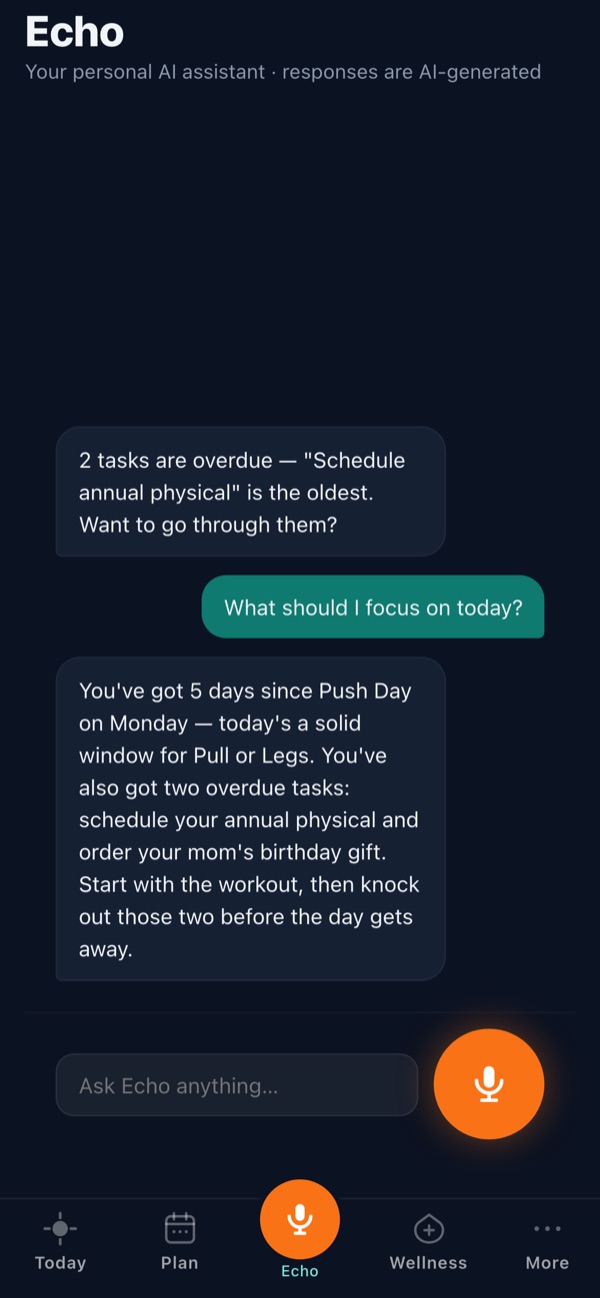
Echo, the built-in AI assistant, answers "what was my last workout?" by naming the exact session and every exercise, tells you what’s next based on your own rotation, and surfaces a new personal record the day it happens. Ask it to swap an exercise — "swap bench press for push-ups" — and it updates that session. It always says it’s an AI, and it’s working from your logged history, not a generic template.
Frequently asked questions
Can AI create a personalized workout plan?
Yes, if you give it your goal, schedule, equipment, experience level and any injuries. It’s good at structuring a split; it’s not reliable on exact progression speed or safety for an existing injury.
Is it safe to follow an AI-generated workout plan?
Treat it as a draft, not a prescription. Start conservatively, let how you actually feel and perform decide whether to add weight, and get an injury, chronic condition or pregnancy cleared by a doctor or physical therapist first.
Can AI tell me how much weight to lift?
Not reliably from a single chat. A general chatbot doesn’t know your last session unless you paste it in every time. A workout log that tracks your actual numbers over time is a better source for that call than a chatbot’s guess.
What should I tell AI to get a good workout plan?
Your goal, days and minutes per week, available equipment, experience level, and any injury or movement to avoid. The more specific the input, the more useful the plan.
Is there a workout app with AI built in?
Complete OS has an AI assistant, Echo, that answers questions about your logged workouts, suggests your next session from your own pattern, and can swap an exercise on request. It costs $9.99 a month with a 14-day free trial, no card required.