
The best apps for shift workers, for your rota and your sleep.
By Complete OS · Published October 26, 2026 · Updated October 28, 2026
“Best app for shift workers” is really two different jobs. One is tracking a rotating or posted schedule — a shift calendar app. The other is planning when to sleep and eat around that schedule — a sleep-timing app. Most single-purpose apps pick one job: Supershift and myShiftWork are shift calendars; SleepShift and Shift Worker Sleep Management are sleep planners. Complete OS covers the schedule and folds it into the rest of your day — habits, meals, budget — but it doesn’t do the sleep-science timing math those dedicated apps do. Prices and ratings below are from each app’s own App Store listing, read October 26, 2026.
Shift calendar apps: tracking the rota itself
If the problem is just “what shift am I on, and when,” a dedicated shift calendar is built for exactly that and usually free to start.
**Supershift** (Supershift GmbH) is free with color-coded shift planning and Apple Watch support, and stores your schedule on the device with no account required. Pro — exporting to your iOS calendar, PDF export, and cloud sync — is $3.99 a month, $9.99 a year, or $39.99 once, for life. It’s the highest-rated shift calendar we found: 4.9 stars from about 5,700 ratings, and it runs on iPhone, iPad and Apple Watch.
**myShiftWork** (listed as “My Shift Planner – Calendar”, by Vozye SMC-PVT Ltd) covers similar ground — color-coded rotating schedules, PDF or text export to share with family — but it’s iPhone-only (no iPad or Watch listed), and its own App Store listing shows several conflicting subscription prices for the ad-free tier, from under $1 to $25 a year. Check the in-app price before you commit. It sits at 4.5 stars from about 140 ratings, a far smaller sample than Supershift’s.
Sleep apps: timing around a rotation, not just tracking it
A shift calendar tells you when you work. It doesn’t tell you when to sleep, eat or cut off caffeine so a 7 p.m.-to-7 a.m. rotation doesn’t wreck your week — that’s a different, narrower category.
**SleepShift** calculates a sleep window from your actual shift pattern, with light-exposure guidance, caffeine-cutoff reminders and Apple Health sleep import. It’s free to try for 14 days, then Pro is $5.99 or Pro Annual is $34.99 a year (about $2.92 a month). It’s rated 5.0, but from a single rating as of this writing — too new to judge by reviews yet, even though the feature set is the most sleep-science-specific of the apps here.
**Shift Worker Sleep Management** plans a 7-to-14-day sleep window from your shift pattern and flags a safe caffeine cutoff time, with optional Apple Health sync. It’s $4.99 a month, $39.99 a year, or $59.99 for a lifetime unlock, rated 5.0 from about 6 ratings — also a thin sample. It’s built for iPad as well as iPhone; Apple Watch isn’t listed.
Where a single-purpose app runs out
None of the four apps above connect your shift to the rest of your day. A shift calendar tells you when you work; a sleep app tells you when to sleep; neither one also holds your meals, your habits, your budget or your tasks — you’re back to switching apps for everything else on top of your schedule.
If your actual problem is just “when do I sleep on this rotation,” a dedicated sleep app like SleepShift does more of that specific math than a general planner does, and for less money if you only need the free tier. If it’s “where’s my schedule and what else is happening today,” that’s the gap a broader planner closes.
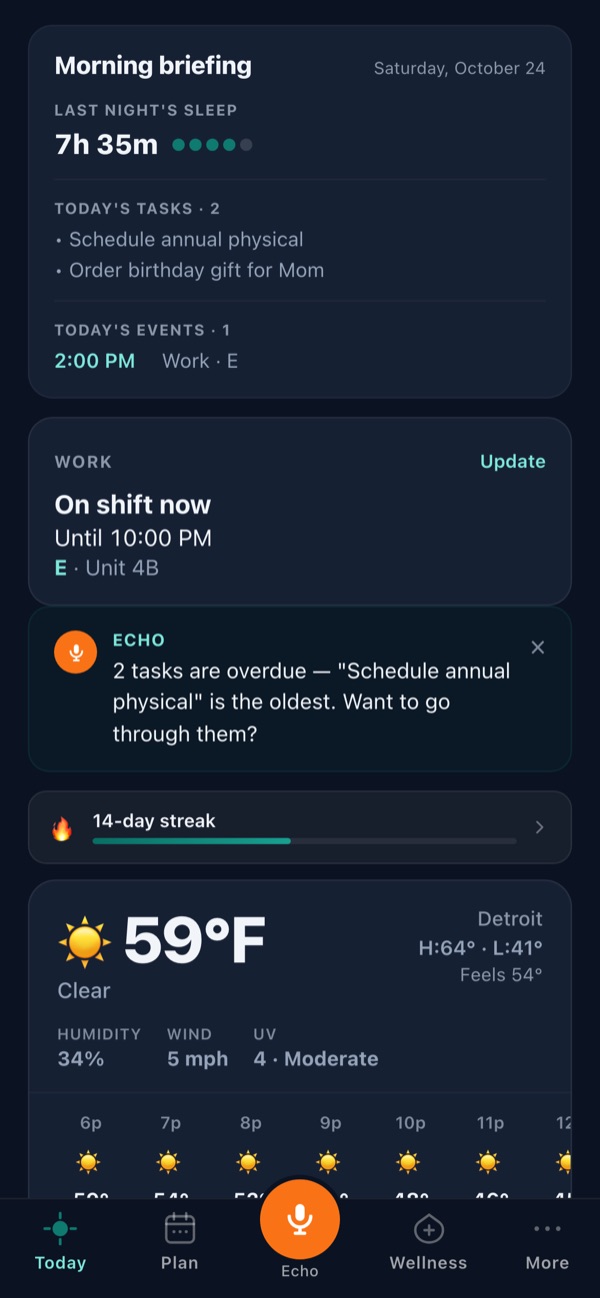
How Complete OS fits around a shift schedule
Complete OS reads a work schedule from a photo or PDF (Plan → + Add → Work schedule), flags any shift it wasn’t sure about for you to check, and puts your current or next shift on the Today screen. The rest of the day follows your wake time instead of the clock, so morning habits land in your actual morning, whether that’s 4 a.m. or 4 p.m. — and a habit you only do on workdays can skip the days you’re off, so a rotation doesn’t break a streak.
What it doesn’t do: generate a rotating shift pattern for you (you import or type in the real one), and it doesn’t calculate a sleep-timing schedule the way SleepShift or Shift Worker Sleep Management do — it asks for your wake time and builds the day around it, which is a coarser tool than dedicated sleep-timing math. If sleep science is the whole problem you’re solving, a dedicated sleep app is the better pick. If the problem is “my schedule, plus my meals, habits, budget and tasks, in one place,” that’s what Complete OS adds: one plan, 14-day free trial, no card required, on iPhone (with an Apple Watch app), Android and the web.
Frequently asked questions
What is the best app for shift workers?
It depends which problem you have. For tracking a rotating schedule, Supershift (free, Pro from $3.99/mo) is the highest-rated dedicated shift calendar we found. For timing sleep and meals around nights, SleepShift or Shift Worker Sleep Management do more specific sleep-science math. For a schedule plus the rest of your day — meals, habits, budget — Complete OS folds all of it into one app.
Is there a free shift schedule app?
Yes. Supershift and myShiftWork are both free to download and use for basic shift tracking, with paid upgrades (export, cloud sync, ad removal) on top. Complete OS is a 14-day free trial, then $9.99 a month.
What’s a good sleep app for night shift workers?
SleepShift and Shift Worker Sleep Management both calculate a sleep window from your actual shift pattern and offer caffeine-cutoff guidance. Both are new enough that their App Store rating counts are thin (1 and 6 ratings respectively as of October 2026), so judge them on features for now, not review volume.
Is there an app that handles rotating shift patterns automatically?
Not one we found, including Complete OS. Shift calendar apps store the pattern you give them; none of the apps here generate a rotation for you. Complete OS imports your real posted or PDF schedule and reads it into your calendar instead.
Can nurses use a shift calendar app for their schedule?
Yes — Supershift and myShiftWork both support color-coded rotating schedules that work for nursing rotas. Complete OS also reads a photo or PDF of a posted unit schedule, lets you pick your name if it lists the whole floor, and puts your shift on the Today screen.
Does Complete OS replace a sleep app for shift workers?
No. Complete OS builds your day around the wake time you give it, so habits and meals land at your real morning — but it doesn’t calculate a sleep-timing schedule the way a dedicated app like SleepShift does. If sleep timing is the main problem, pair it with one of those, or use Complete OS for the schedule, meals and habits and a sleep app for the sleep math.